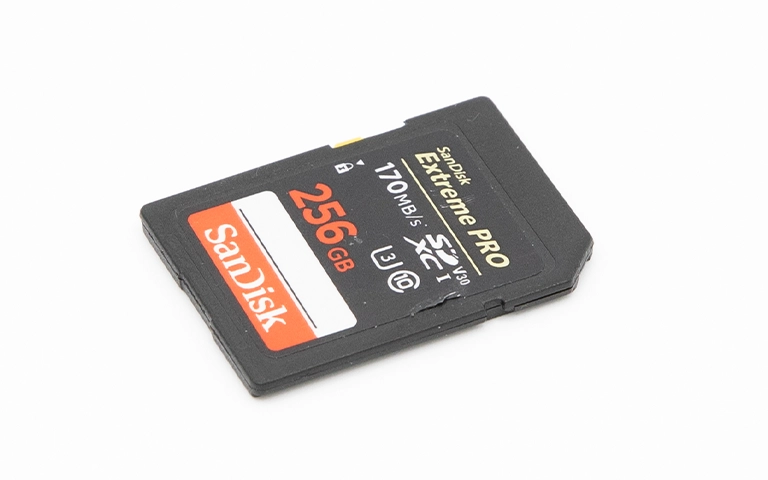
A professional photographer experienced SD card corruption during an active assignment, losing access to critical photos and videos. The media was a SanDisk 256GB Extreme PRO SDXC UHS-I card, and the failure presented as immediate unreadability across devices.
Initial assessment indicated physical harm and damaged sectors, which made direct access unreliable. In these cases, the priority is preserving what remains readable and preventing further deterioration.
Our engineers moved into a controlled recovery workflow designed for corrupted flash media, focusing on cloning first and reconstruction second to maximise successful retrieval.
Problem: SD Card Corrupted, Photos and Videos Unreadable
The customer could not access any pictures or videos on the SanDisk Extreme PRO SD card. Devices were unable to read the card reliably, which is consistent with corruption combined with media-level damage.
What the customer faced
- Sudden loss of access to photos and videos during an assignment
- Card unreadable across devices and readers
- Corruption indicators consistent with damaged sectors
What was at risk
- Additional data loss if the card remained in use
- Overwrites from “format” prompts or repair attempts
- Fragmented media becoming harder to reconstruct
If the card is failing to appear or mount, read more on SD card not showing up, what to do.
Industry-Leading 99% Success Rate
No hidden fees. No surprises. Just expert data recovery you can trust. We handle everything from simple file loss to extreme data recovery cases. If we can’t recover your data, no one can.
Media Profile: 256GB SDXC UHS-I Card in a Pro Workflow
This case involved a 256GB SDXC UHS-I card used in a professional photography workflow, where the card is continuously written to and data is frequently reviewed or transferred between shoots. That usage pattern increases exposure to interruptions, power events, and handling stress during critical moments.
When corruption occurs mid-assignment, the impact is immediate: deliverables are blocked, deadlines tighten, and every additional attempt to “check the card” can reduce recoverability.
In this scenario, the correct strategy is containment, then controlled recovery against a cloned image rather than direct reads from the original media.

Root Cause Summary: Physical Damage and Bad Sectors
Diagnostics showed damaged sectors on the SD card, making it impossible for devices to read the media consistently. This is a media-level failure pattern, where parts of the storage surface cannot reliably return data.
Why that matters
- Standard readers and operating systems will retry bad areas, increasing stress and timeouts
- Corruption can expand as the controller struggles to map failing sectors
- Recovery must prioritise cloning and reconstruction, not “repair” actions
For strict handling and contamination control standards, see our certified cleanroom overview.
Don't Let Data Loss Ruin Your Business
Minimize business disruption. We retrieve lost data fast, so you can focus on what matters.
Diagnostics Highlights: What We Verified Before Recovery
We first confirmed the corruption pattern and determined whether the media could be read safely enough to clone. The objective was to stabilise the case, then shift recovery work away from the original card.
What we validated
- Readability behavior and error patterns indicating damaged sectors
- The safest approach to capture data without triggering additional degradation
- Whether reconstruction would be required due to fragmentation and unreadable areas
With damaged sectors confirmed, we proceeded with sector-level cloning first, then extraction and reconstruction on the clone.

Recovery Process: Sector Cloning, Scanning, Reconstruction
Sector-by-sector clone first
We created a complete clone of the SD card to avoid further degradation of the original media and to preserve the best available state for recovery.
Scan the clone for readable sectors
Using specialised SD card recovery tooling, we scanned the clone to identify readable areas and map the damage footprint.
Isolate damaged sectors
We separated failing regions from stable regions to prevent repeated retries that can stall or worsen recovery.
Reconstruct fragmented data
We rebuilt files by reconstructing fragmented structures where corruption had broken continuity across sectors.
Extract and organise recoverable content
We extracted photos and videos into a readable structure from the reconstructed dataset.
For service scope and supported media, explore SD card data recovery.

Result and Verification Delivered
After cloning, scanning, and reconstruction, our engineers successfully retrieved the client’s critical photos and videos from the corrupted 256GB SanDisk Extreme PRO SD card. Recovery operations were executed against the cloned image to protect the original media from additional wear.
The recovered data was validated for usability and organised into an accessible format, enabling the client to continue post-production and meet assignment requirements.
Emergency Data Recovery Services
Unexpected data loss? Whether it’s a crashed system, failed storage device, or accidental deletion, our 24/7 emergency recovery service ensures priority assistance to retrieve your critical data.
Contact Us for SD Card Data Recovery
If your SD card corrupts during a shoot, stop using it immediately. Continued use can overwrite recoverable data and compound damaged sector behavior.
We provide controlled SD card recovery workflows built around cloning first and reconstruction second, which is the most defensible approach for corrupted flash media.
Contact our team to start an engineering evaluation and get clear next steps.